
Wachty. PL

Duty Shift.

Your Marine Watch Assistant.

Sailing is a pleasure — managing the crew is a responsibility. Let the app take the helm of your schedule while you enjoy the wind.

Download on the App Store

Algorithm Precision,
Captain's Peace of Mind.

The Duty Shift app is more than just a simple schedule. It's an advanced tool that ensures fairness and safety on board. Whether you're sailing with family or a professional racing crew, Wachty adapts to your style of sailing. An automatic logbook records your route, and smart notifications wake the crew on time.
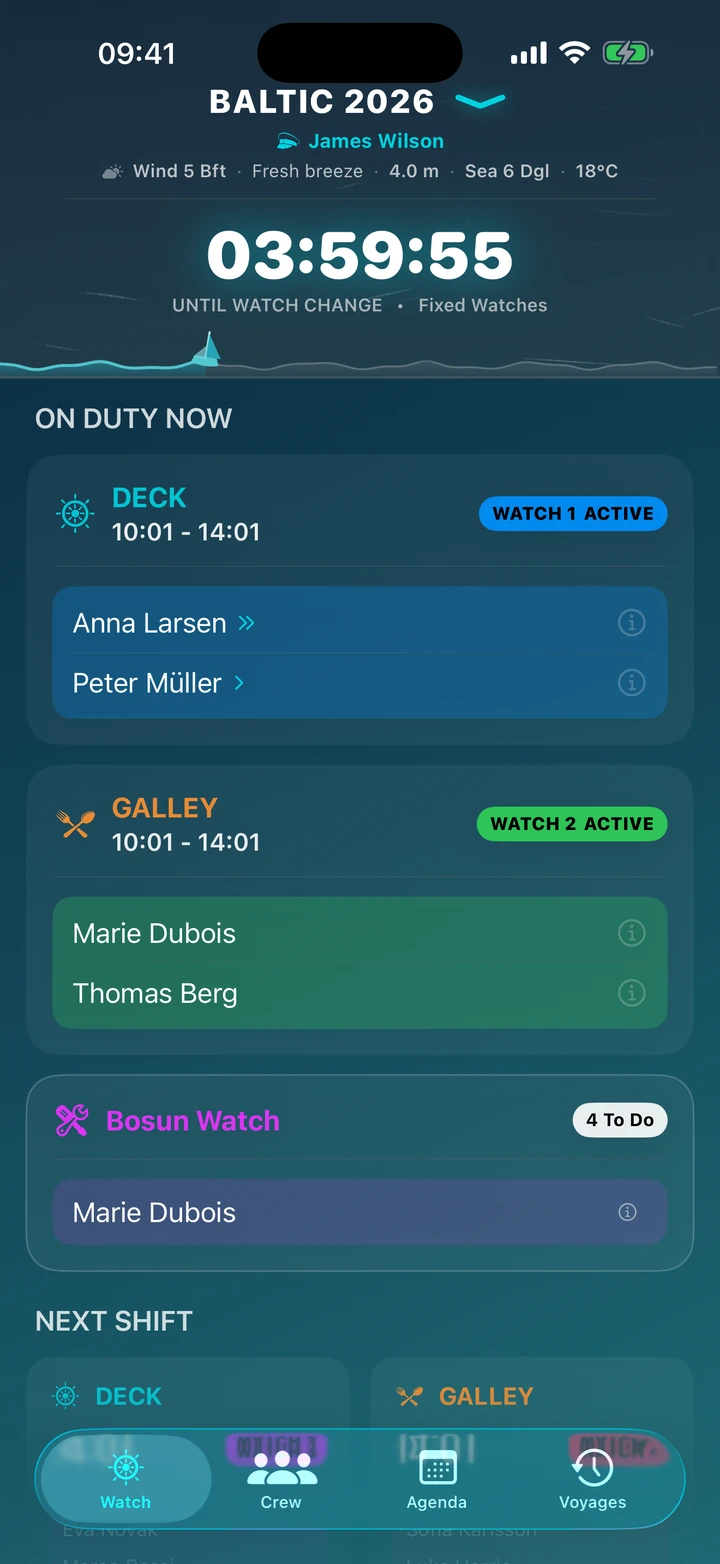
App screen — watch clock

Interface

Command Center

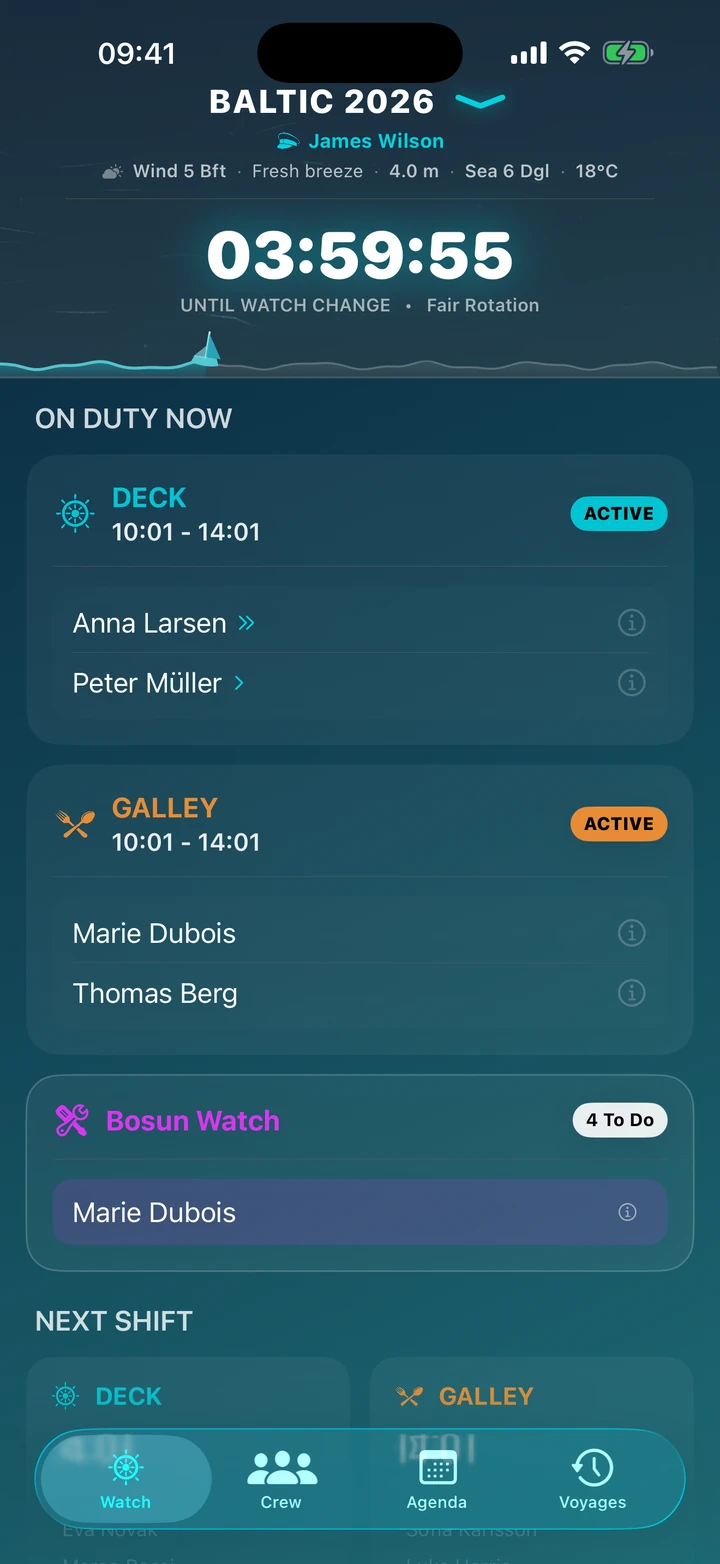
Main App Screen — Watch Clock

Here and now. See who's currently at the helm, who's working in the galley, who's on bosun watch and who is resting. A large timer counts down to the next change — one glance is enough to read the situation on board.

A progress bar shows how far you are from your destination, while the animated sea ripples to the current wind strength and wave height. Below it you'll find the live conditions: wind on the Beaufort scale, sea state and temperature.

Turn on "It's Me" and the app highlights your watches and alerts you only before your shift — the rest of the crew sleeps soundly. The captain can also leave a note here for the whole crew.
Crew and bosun task lists

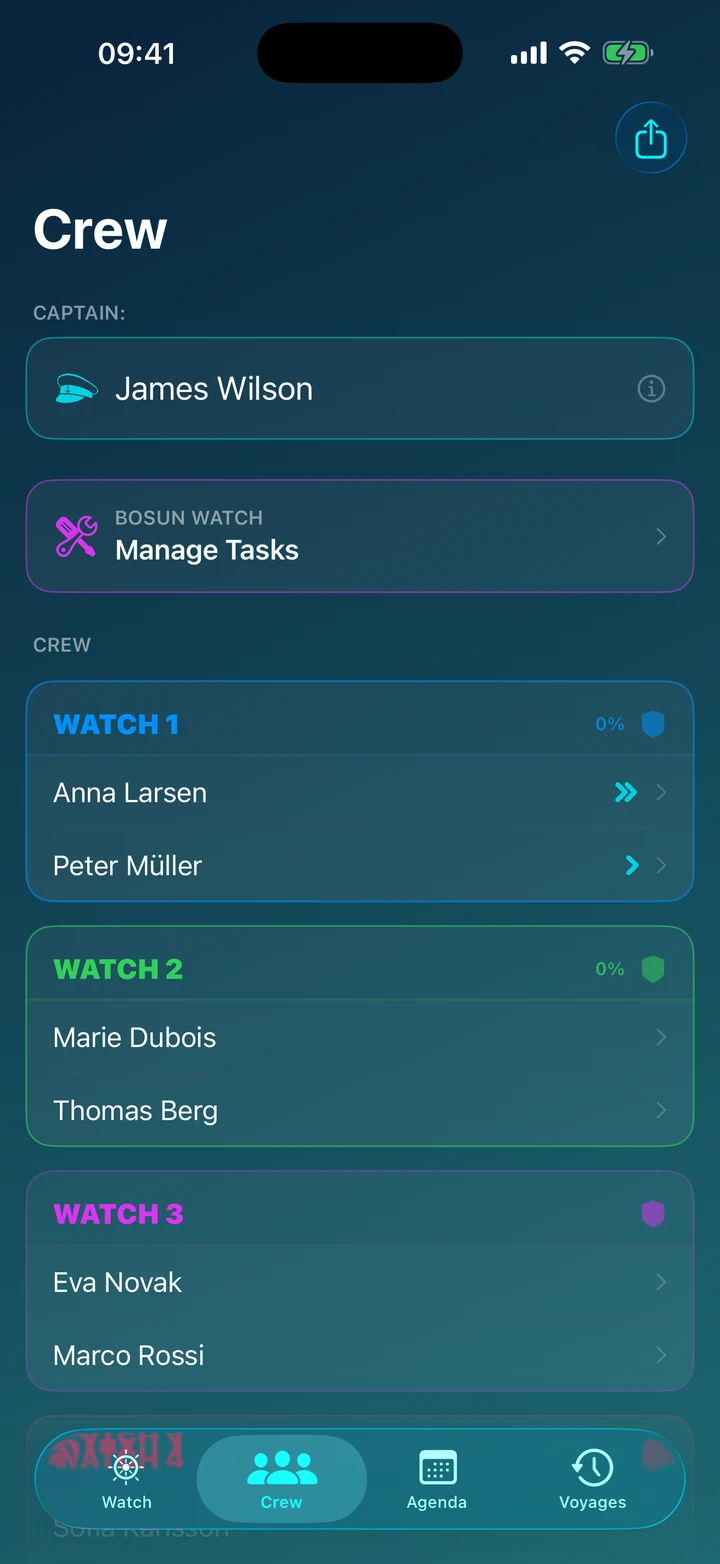
Crew and Bosun Task Lists

An attendance list with a live preview. Colour-coded status icons instantly show who is asleep, who is at the helm, and who is on galley or bosun duty.

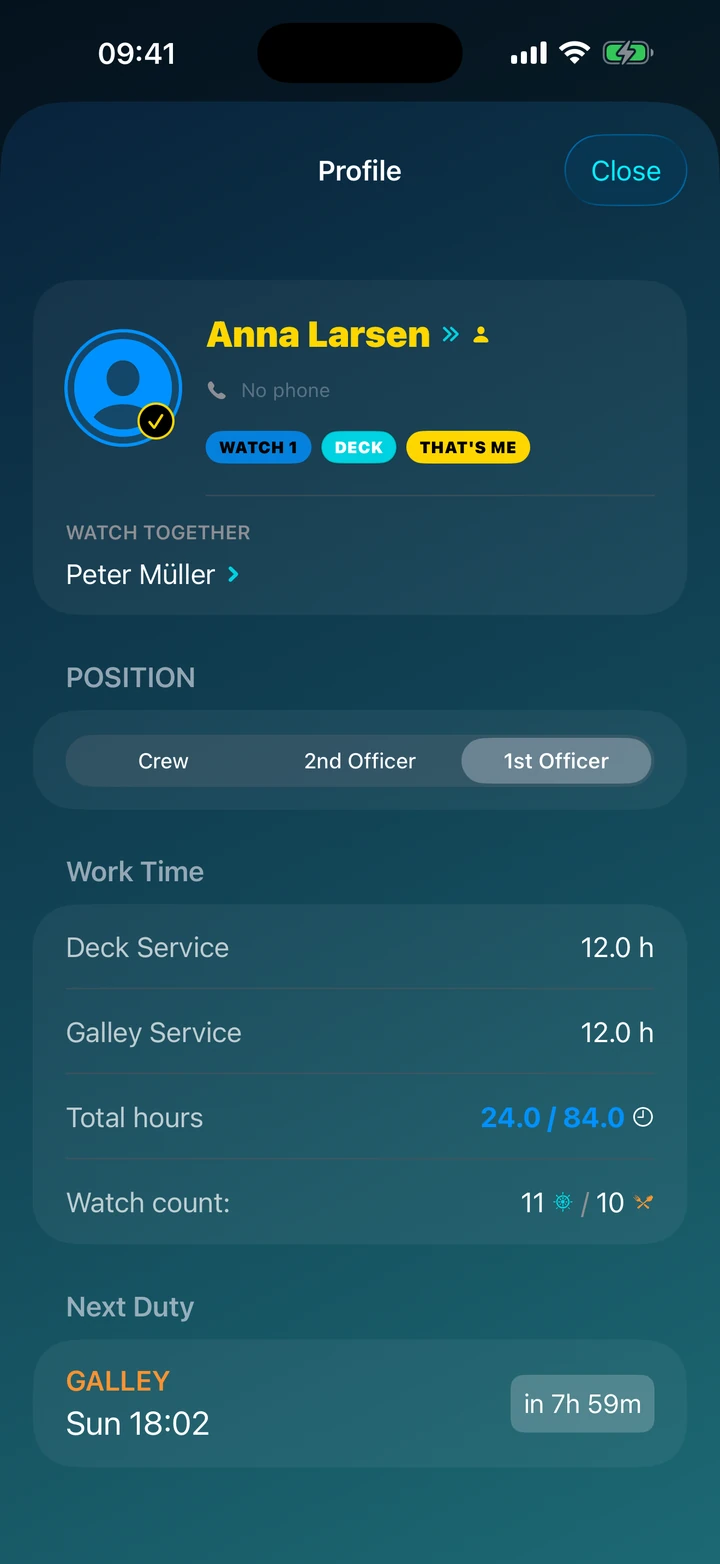
Each sailor's card gathers their stats — number of watches and hours worked — so you can see at a glance that the workload is shared fairly and no one feels short-changed.

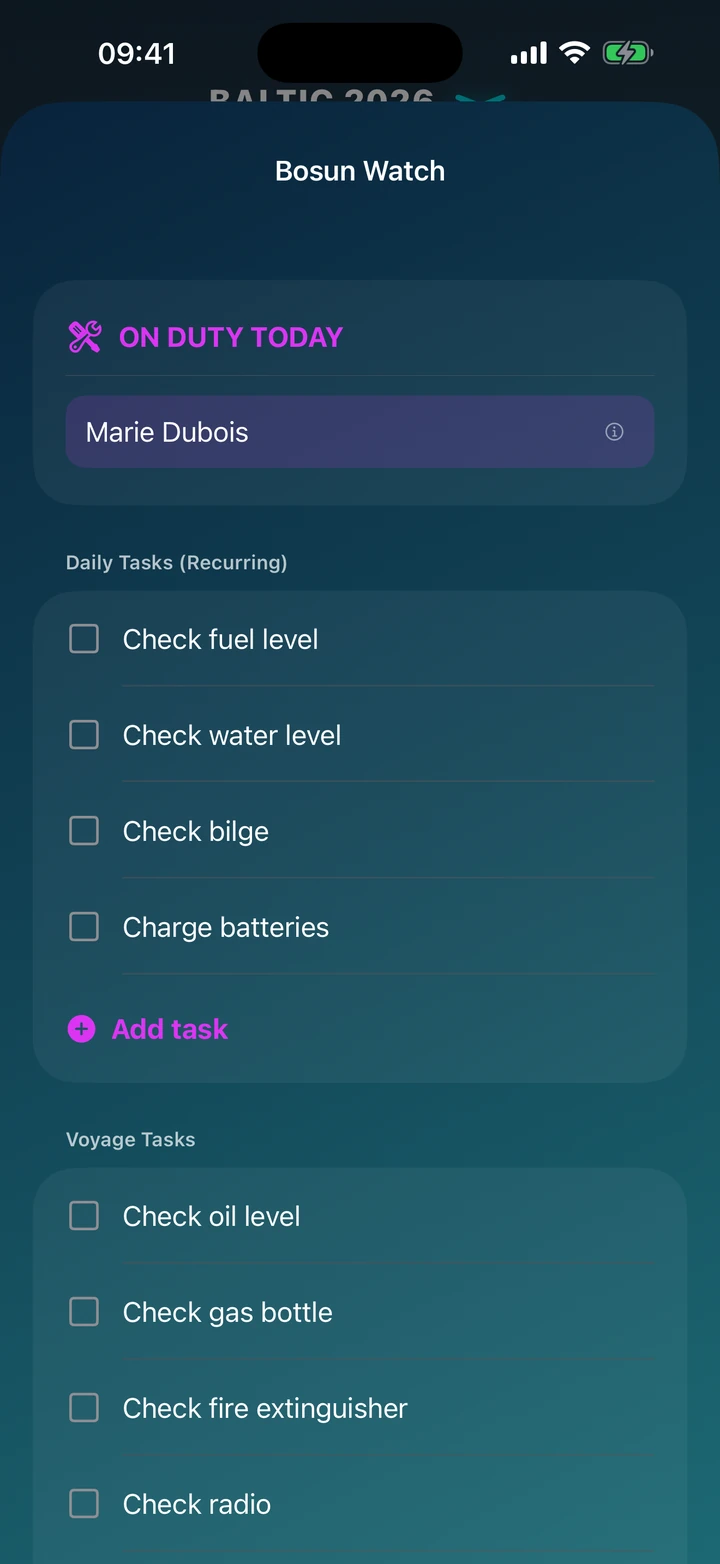
Keep the bosun task lists in one place: repeating daily checks (water, fuel, batteries, bilge) and a to-do list for the whole voyage.

Tap your avatar and enable "It's Me" — your name and upcoming watches get highlighted on every screen of the app.

Voyage schedule

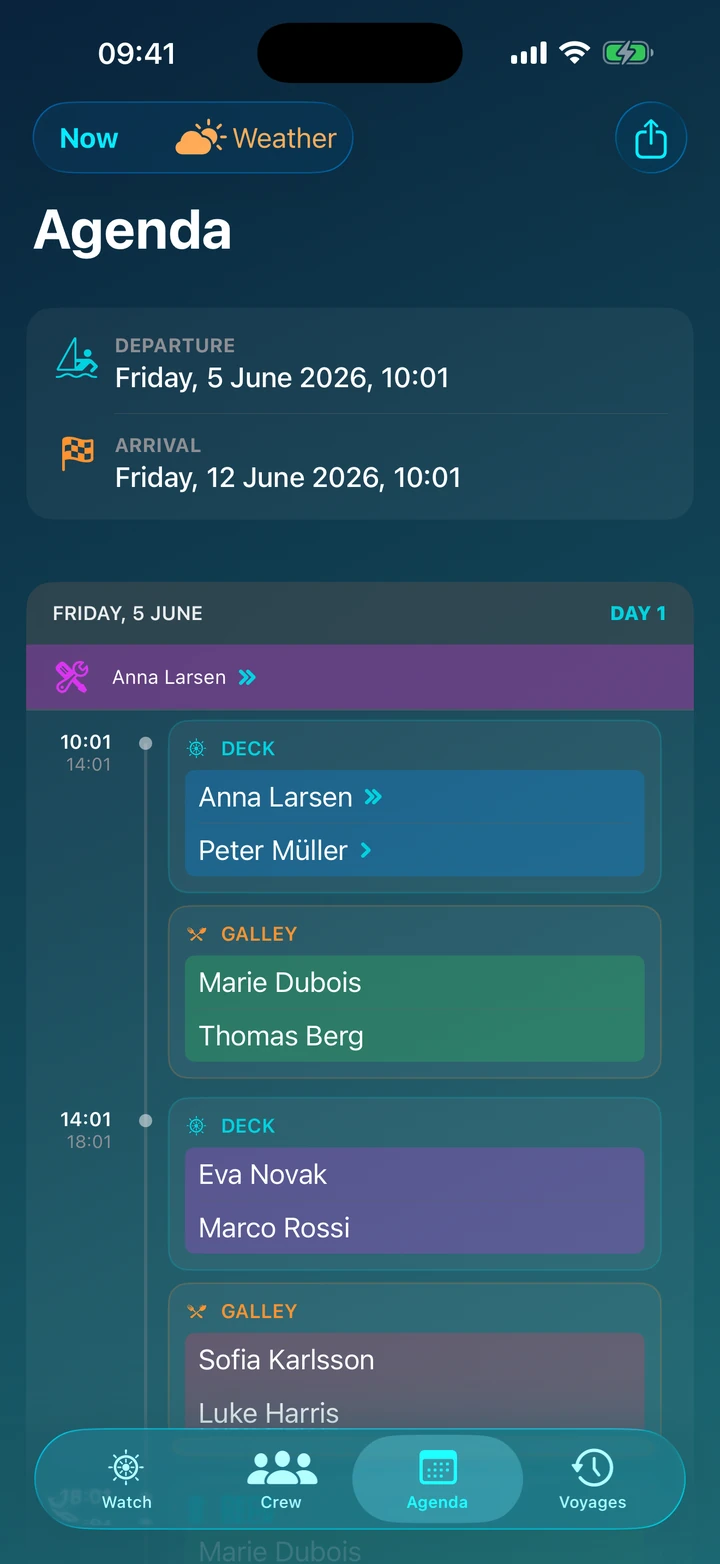
Voyage Schedule

A timeline of the entire voyage — a clear day-by-day view from departure to arrival. Check when your next watch falls, even several days ahead.

Every watch card shows the crew on duty and the forecast for that exact shift: wind on the Beaufort scale, sea state on the Douglas scale and temperature. When the wind picks up a storm warning appears, so you can plan rest and meals in advance.

Quiet nights and breaks in the watch rota are marked right on the timeline — you know which nights are free before you even set sail.

Archive & settings

Archive & Settings

Your sailing history — access completed voyages, statistics of miles sailed, and hours spent on watch.

Section for creating new voyages or importing voyages shared by other crew members.

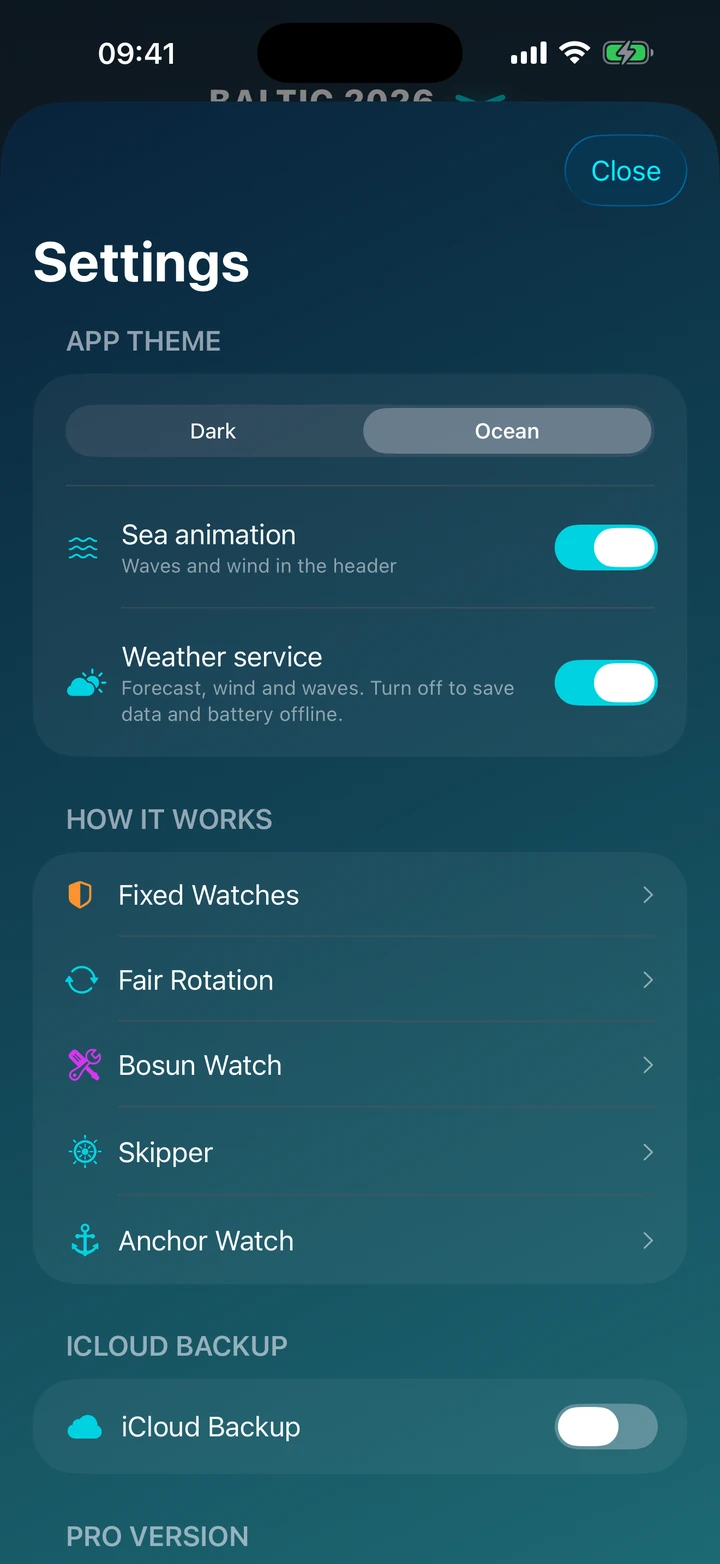
Display mode settings — dark mode for night adventures and light mode for more comfortable viewing.

Detailed scenario descriptions and a store with the option to purchase the PRO version.

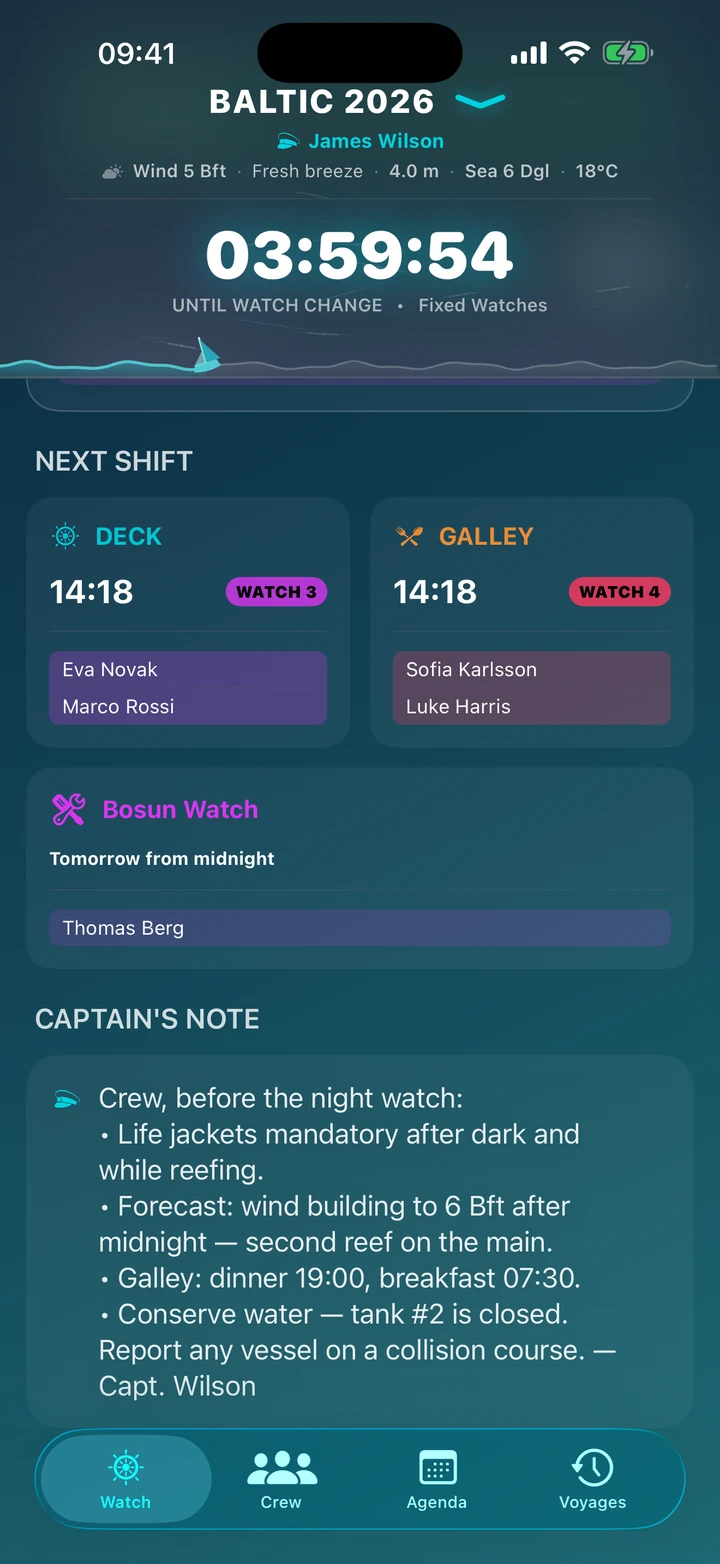
Captain's note on the Wachty app main screen — a message for the crew

Captain's Note

One message for the whole crew.

A briefing that's always within reach.

The captain leaves a note on the main screen, visible to everyone — a briefing for the whole voyage: safety rules, the plan, the key arrangements. It travels to the crew together with the schedule, so everyone keeps it right on their dashboard, with no group chats or sticky notes pinned up in the saloon.

  • One briefing for the whole voyage: write what matters before you cast off and it's settled with the entire crew.
  • Shared with the voyage: the note travels to the crew along with the schedule — via QR code or the voyage file.
  • Always within reach: it waits at the bottom of the dashboard, right below the watch sections.

New · Marine weather

Weather on board

Wind, waves and a Wind Rose — straight from the weather map.

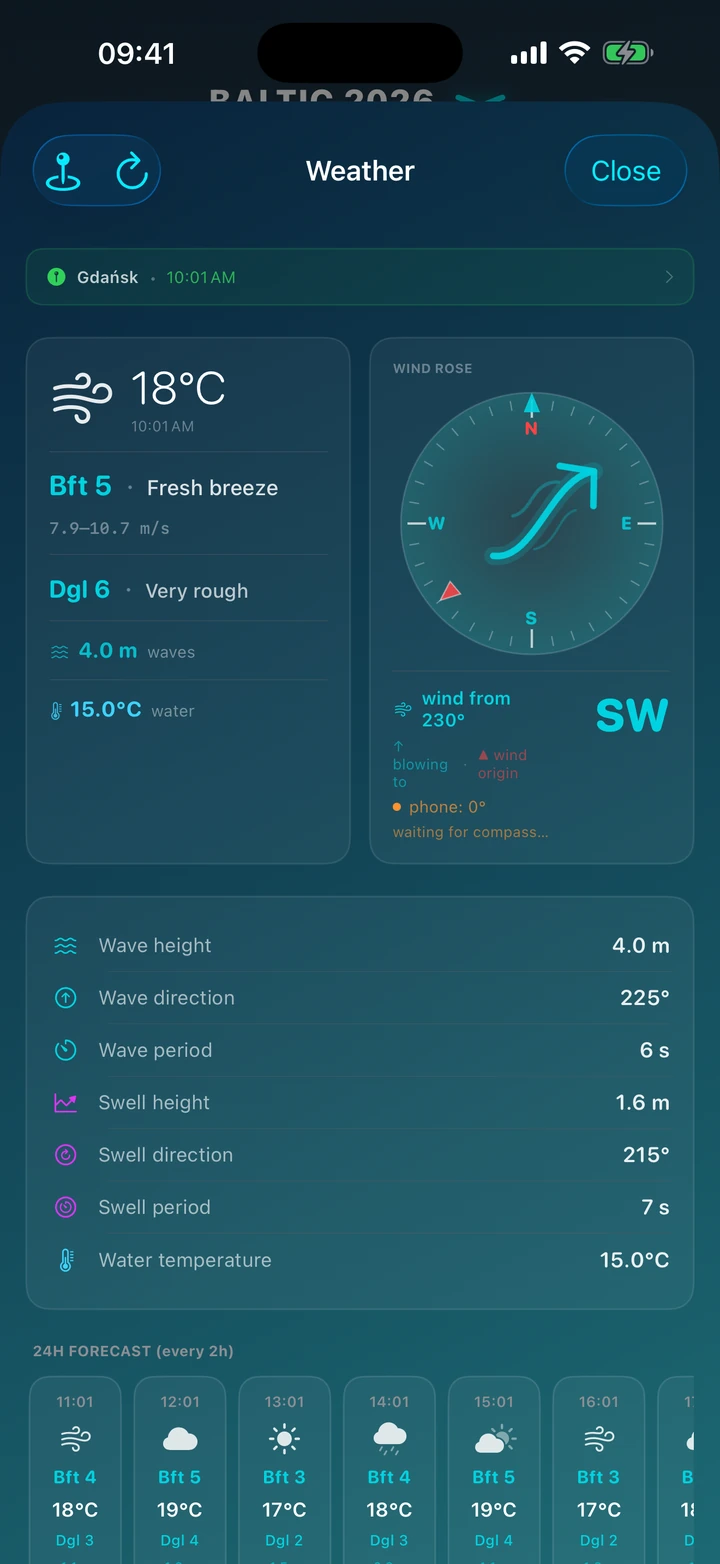
Wachty pulls a marine forecast from Open-Meteo and shows exactly what matters on the water: wind strength on the Beaufort scale, temperature, wave height on the Douglas scale, swell and water temperature.

The interactive Wind Rose shows where the wind comes from and where it's heading, and the compass reacts as you turn your phone. A 24-hour hourly forecast helps you plan shifts, and the app warns you before a storm when the wind picks up.

  • Wind Rose & compass
  • Beaufort & Douglas scale
  • Waves, swell, water temp
  • 24h hourly forecast
  • Storm warnings
  • Weather on agenda cards
Weather screen in the Wachty app — Wind Rose, wind, waves

Living sea animation

The dashboard comes alive: water ripples to the Douglas scale and the boat shows your voyage progress.

Route map with checkpoints

Numbered pins along the route, each with a logbook entry and weather. Replay the whole voyage point by point.

GPX export

Save your track as standard GPX — open it in OpenCPN, Navionics, Garmin or Google Earth.

iOS widget

“Who's on watch now” right on your home screen, counting down to the next change.

iCloud backup

Back up voyages to your own iCloud folder — never lose history when you switch phones.

Logbook with weather

Every entry records wind, waves and temperature — a full history of your voyage conditions.

Schedule Scenarios

Fixed System — clock screen

Fixed System

Stability and predictability. A classic of sailing.

In this mode, you divide the crew into fixed teams (watches). Janek always sails with Kasia, and Marek with Tomek. This is the perfect solution when you want to build teamwork within subgroups and maintain a strict daily routine. You know exactly who's at the helm with you and when you go to sleep — from the start to the end of the voyage.

Choose this mode if you value a consistent daily rhythm.

  • How it works: The app splits the crew list into fixed groups (e.g., Watch 1, Watch 2) in the order from the list.
  • Schedule: Groups rotate cyclically (e.g., every 4 hours). If Watch 1 is on deck, Watch 2 can be in the galley, and Watch 3 rests.
  • For whom: Large crews, training voyages, situations where a watch must consist of an experienced skipper and a novice (pairs are fixed).
Rotational System — clock screen

Rotational System

Everyone sails with everyone. No more boredom or arguments.

Let the algorithm take care of morale! The rotational system shuffles watch assignments at every change. This helps the crew bond better, and no one feels disadvantaged by worse hours or a more challenging partner. The app ensures that everyone spends the same amount of time on deck and in the galley, while maximizing sleep time.

Choose this mode to ensure maximum fairness.

  • How it works: There are no fixed pairs. At each watch change, the algorithm assigns the crew anew, making sure people don't repeat with the same partners.
  • Algorithm: The system analyzes each crew member's watch history, ensuring equal workload and maximum uninterrupted rest between shifts.
  • For whom: Close-knit groups of friends, leisure voyages, crews with balanced skill levels.
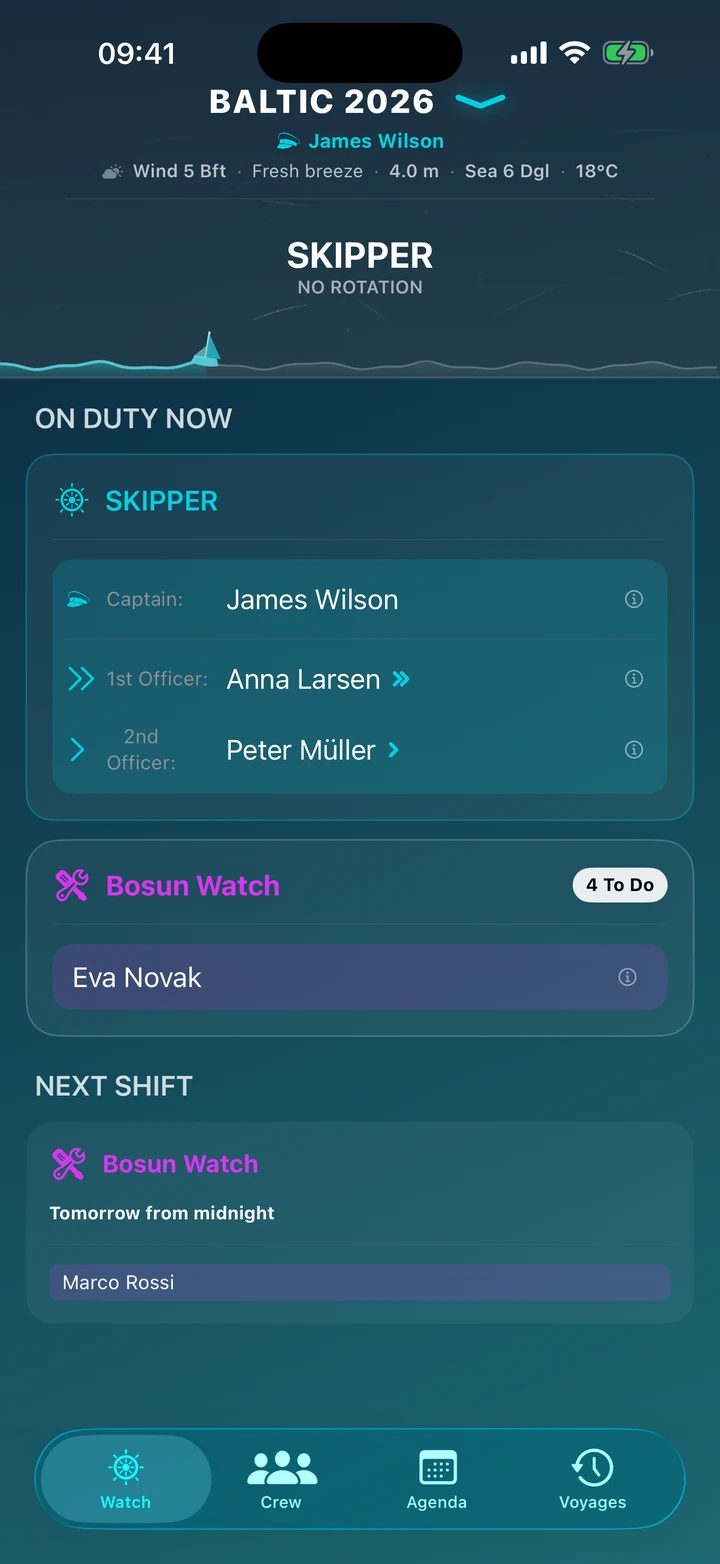
Skipper System — clock screen

Skipper System

You steer, they rest (or cook).

This mode is designed for family voyages, training trips, or crews with a small number of experienced sailors. In this scenario, the Captain and Officers (Officer Watch) navigate the yacht at all times. The rest of the crew is relieved from steering but can take the 24-hour Bosun Watch — handling order, meals, and the yacht's technical condition. Safety is in the hands of professionals, hospitality in the hands of the crew.

Choose this mode when navigation rests on the shoulders of the command staff.

  • How it works: The app does not generate a steering schedule for the crew. The yacht is navigated by the Captain and the 1st and 2nd Officers (either rotationally or at the Captain's discretion).
  • Crew role: The crew is assigned to the so-called Bosun Watch. This duty lasts 24 hours (from midnight to midnight).
  • Bosun duties: Those on the Bosun Watch do not steer but carry out technical and maintenance tasks (checking fuel, water, batteries, preparing meals).
  • For whom: Voyages with children, commercial trips with a skipper, small crews with many passengers.

Bosun Watch

Bosun task list

Yacht Under Control.

Good sailing is not just about steering. It's about taking care of the vessel.

Forget questions like: "Did anyone check the oil?" or "Why is there no water in the tank?" The Bosun Watch is your digital technical officer.

It's an independent layer of the schedule, operating in parallel with the navigation (deck) watches. It manages the yacht's technical and operational tasks.

  • 24-Hour Cycle: Unlike helm watches (changing, for example, every 4 hours), the Bosun Watch lasts a full day (usually from midnight to midnight).
  • Daily Tasks: Repetitive actions that "reset" every day (e.g., checking water and fuel levels, battery voltage, bilge inspection).
  • Voyage Tasks: To-do list for the entire voyage (e.g., taking over the yacht, checking life jackets, safety briefing).

Themes: Light / Dark

Safety and Comfort

An interface that respects your eyes. At sea, lighting conditions can change drastically — Duty Shift adapts to them.

Night Mode (Dark): Designed for night watches. Dark backgrounds and muted colors prevent glare, allowing your eyes to stay adjusted to the dark. Check your course, put away your phone, and still see the horizon.

Ocean Mode (Light): A modern, marine gradient (Deep Navy & Teal) that provides perfect contrast and readability in full sunlight on deck.

It's Me feature — crew member profile card

"It's Me" Feature

Smart Identity Management.

Don't wake the whole crew. Wake only the right watch.

Duty Shift is the first app that understands who you are on board. With the "It's Me" feature, you select your profile from the crew list, and the app personalizes your entire experience:

  • Discreet Notifications: You receive alerts only before your watch. The rest of the crew sleeps peacefully.
  • Quick Preview: Your name and upcoming watches are visually highlighted, so one glance at the screen is enough to know when you need to get up.
  • Activation: Click your avatar on your stats card.

How It Works — Creating a Voyage

Voyage Creator in three simple steps.

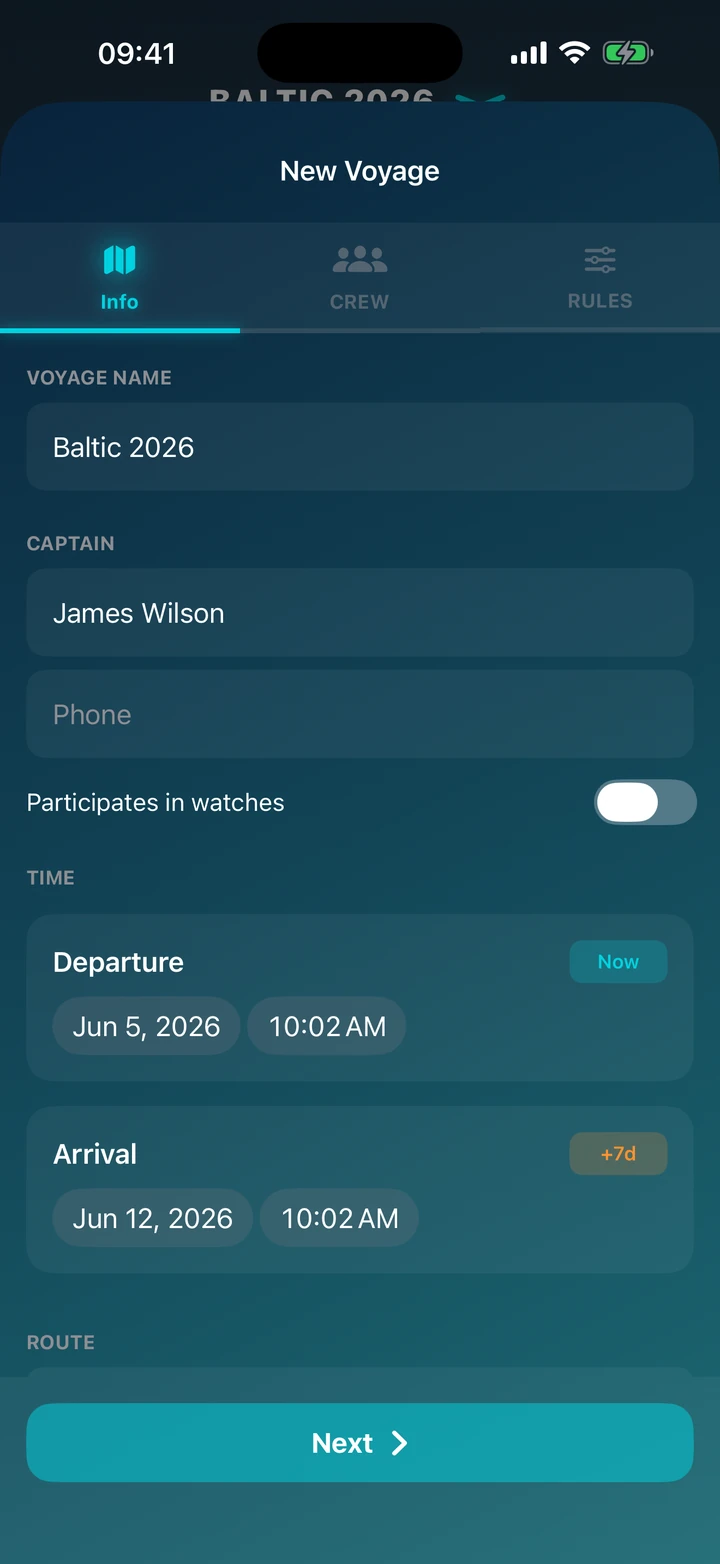
Step 1: INFO Card

Step 1: INFO Card

This is where you define the timeframes and geographic scope of your voyage.

  • Name the Voyage: Enter a name visible to the entire crew (e.g., "Croatia 2025").
  • Set the Captain: Enter your details. Use the "Captain participates in watches" toggle if you want the app to include you in the schedule.
  • Set the Timeframes: Choose the departure date and time (you can use the "Now" button). Specify the planned arrival date (the "+7d" button automatically sets one week).
  • Set the Route: Click "Start Location" and "End Location" to open the map and precisely select ports or marinas.
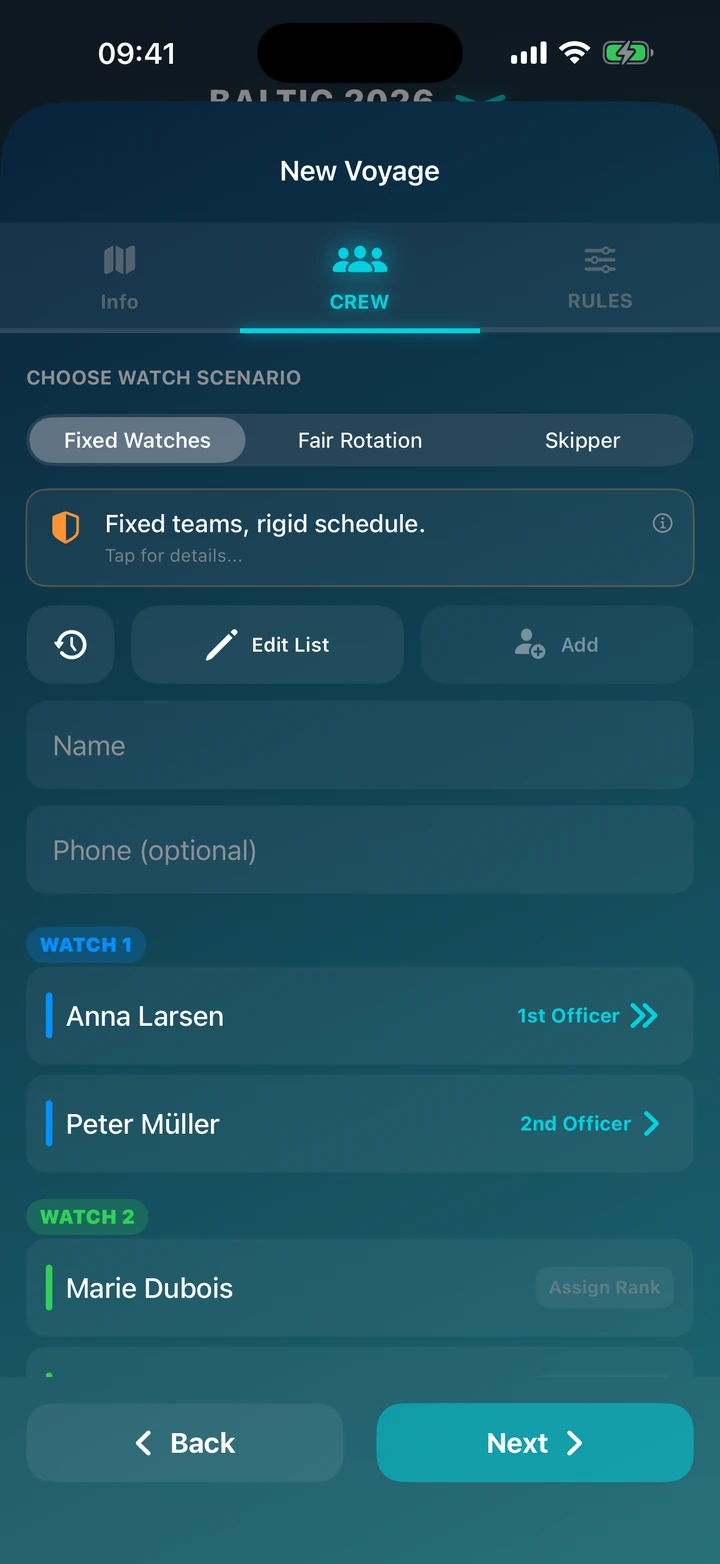
Step 2: Crew Assignment

Step 2: Crew Assignment

The heart of the app — here you decide which watch system you'll use and who joins the crew.

  • Choose a Scenario: Fixed System, Rotational System or Skipper.
  • Add Crew: Enter the name and (optionally) phone number. Use the "History" button to quickly add friends from previous voyages.
  • Set the Order: In the Fixed System, the order on the list matters. The first people will form Watch 1, the next Watch 2.
  • Assign Ranks: Click the button next to a name to appoint someone as 1st or 2nd Officer.
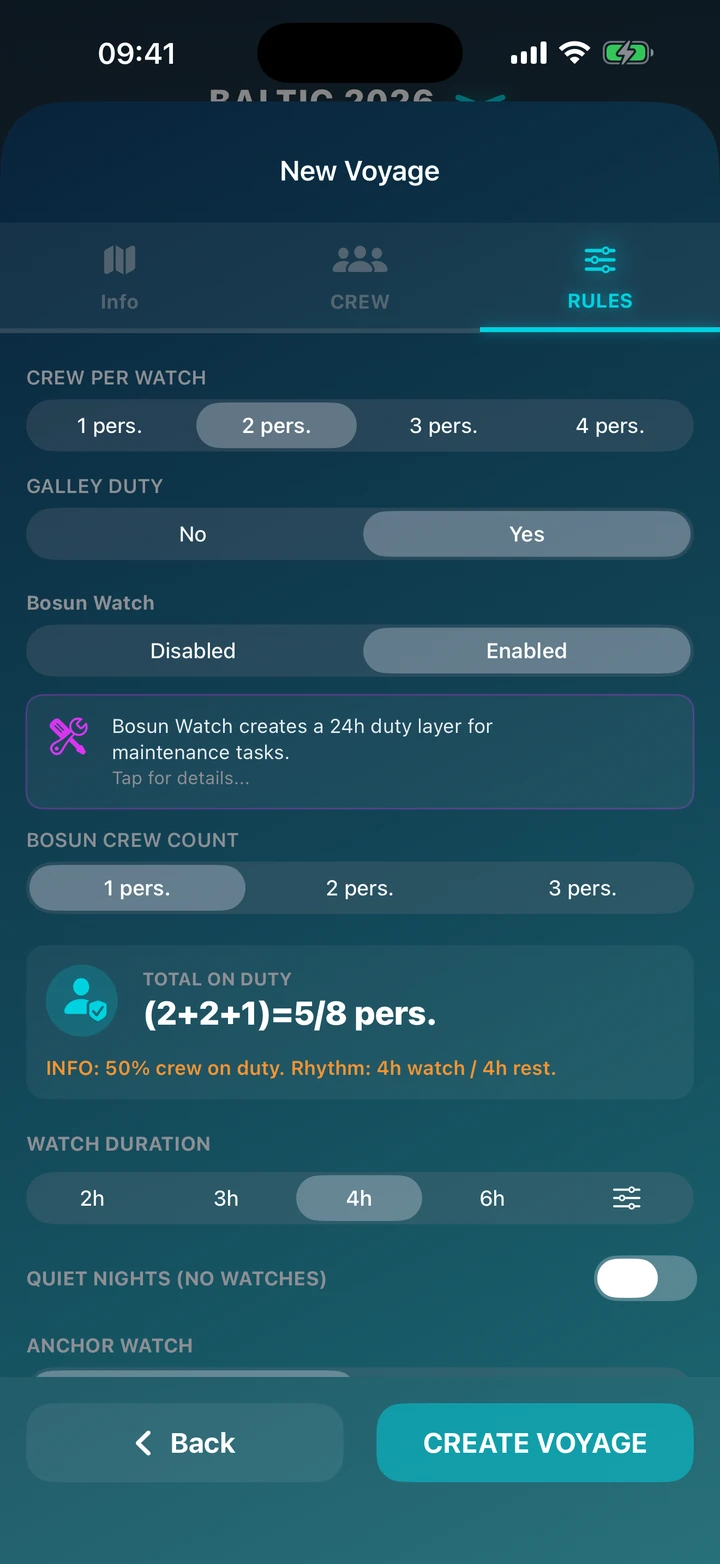
Step 3: Watch Parameters

Step 3: Watch Parameters

Adjust the algorithm to your yacht's specifics and crew preferences.

  • Watch Configuration: Set how many people will be on deck duty and whether you want an additional galley watch.
  • Bosun Watch: Enable an additional 24-hour duty for yacht maintenance.
  • Duration: Choose the length of a single watch (e.g., 3h, 4h) or set a custom time (available in PRO).
  • Night Mode: Enable "Quiet Nights" and define the hours (e.g., 23:00 – 06:00).
  • Notifications: Configure if and when the crew receives alerts on their phones.

PRO Features

Standalone anchor alarm

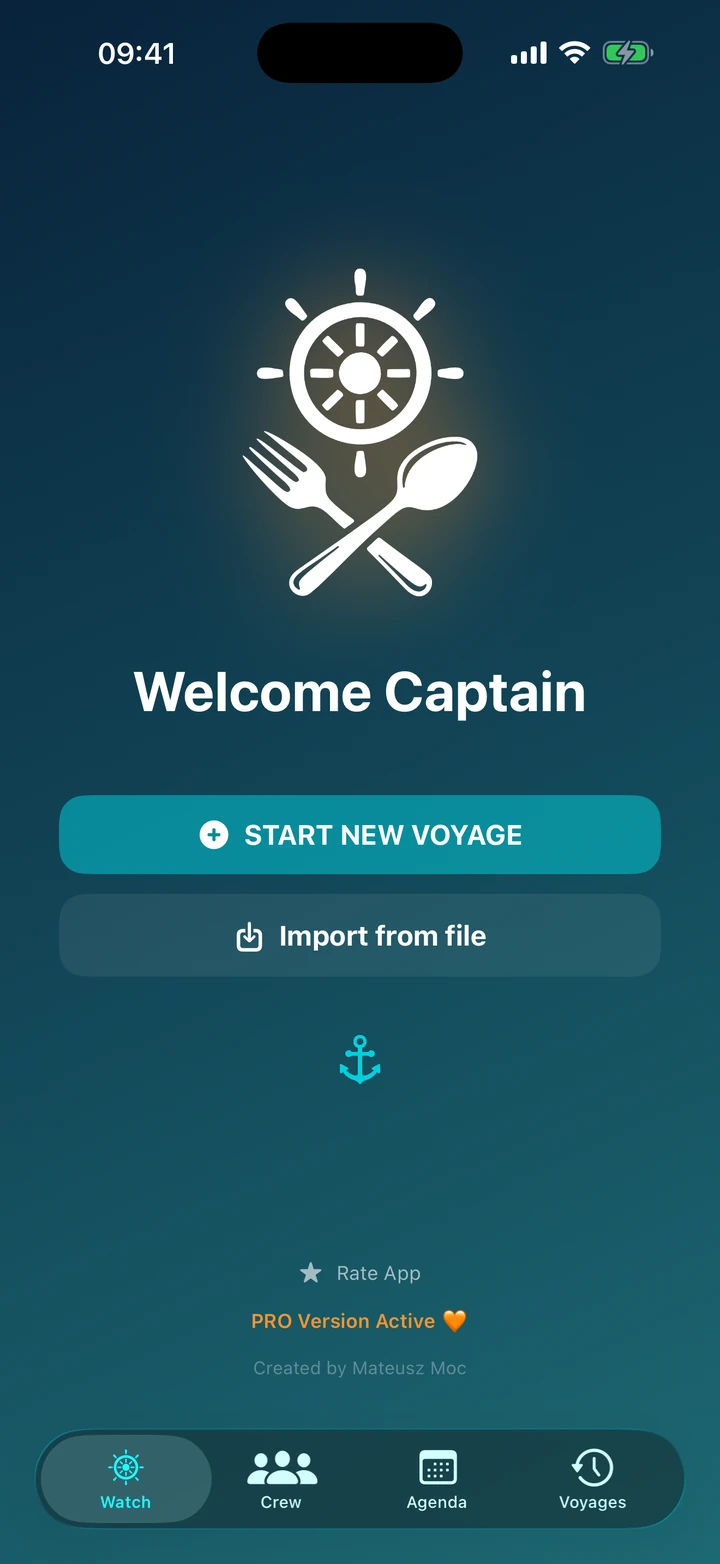
You don't need to create a voyage just to drop anchor. Launch the standalone anchor alarm straight from the start screen — simply tap the anchor.

You get the same drift radar and drift alarm (in the background too), with no crew or schedule to set up. Perfect for a quick stop, lunch in a cove, or a night solo.

PDF Export

PDF Export & voyage file

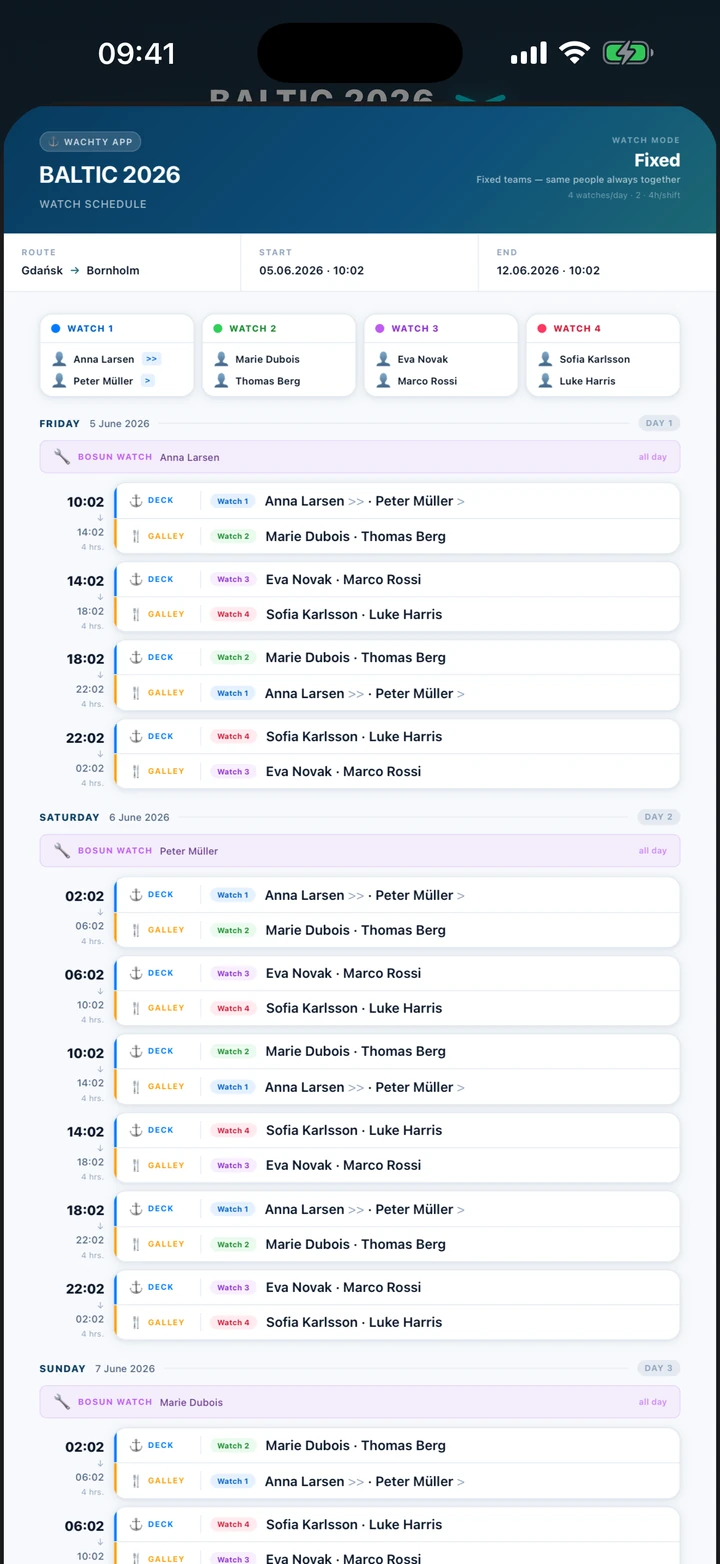
Generate a complete Crew List and watch schedule with one click — ready to be printed and posted in the mess. Generation is available from the active voyage card menu (clock icon) or directly from the Crew and Agenda tabs.

You can also send a whole voyage with one tap. The .wachty file holds everything — crew list, bosun tasks, watch schedule, and statistics. Pass it along via message, email, or AirDrop, and the recipient opens it in the app where the entire plan loads automatically.

QR Synchronization

QR Synchronization

The whole crew on the same voyage plan in seconds.

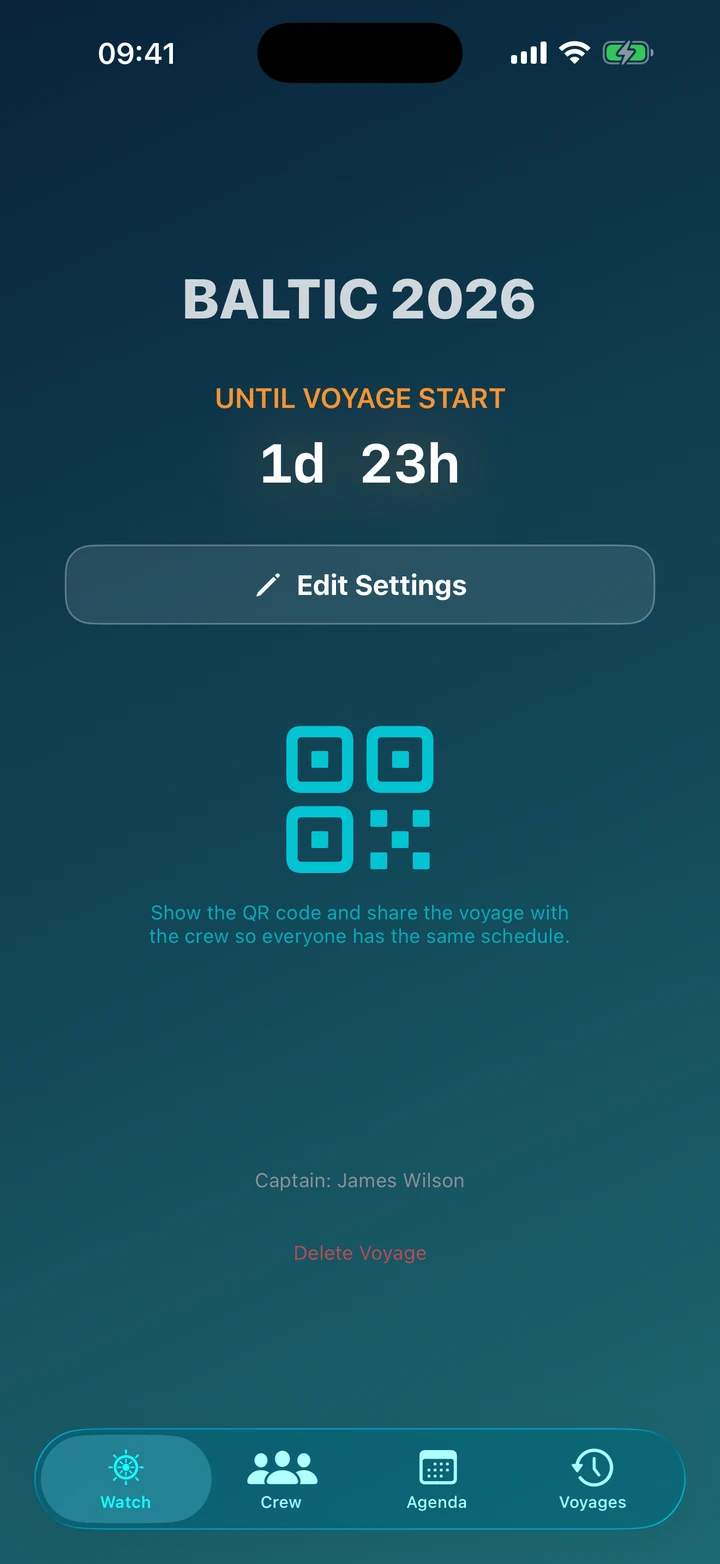
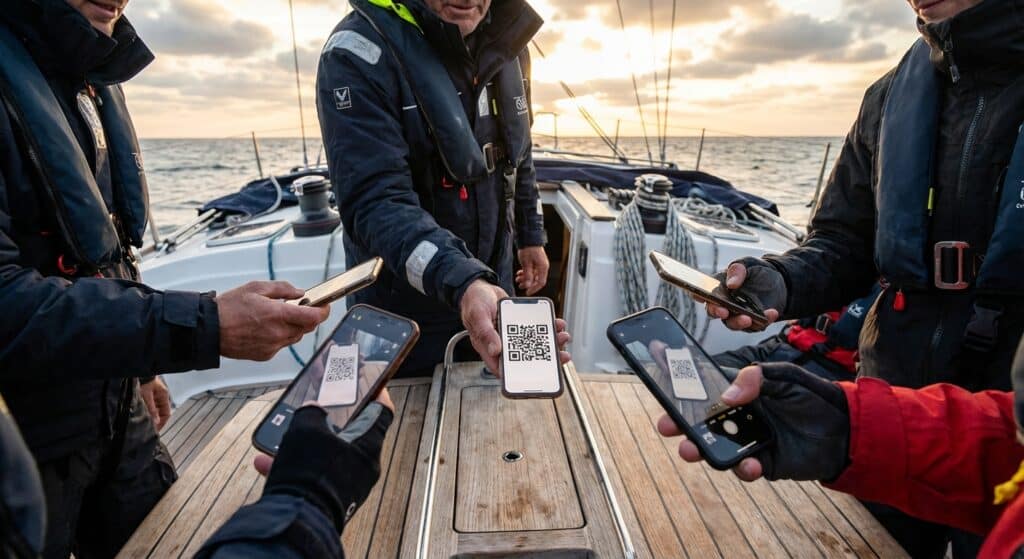
What's it for? Instead of dictating names, watch times and settings to everyone separately, the skipper generates a single QR code. Each crew member scans it with their phone and gets the exact same, complete schedule — no mistakes, no re-typing.

How it works:

  • Skipper taps the clock icon on the active voyage card and shows the QR code.
  • Crew scans the code with the phone camera. You can also scan straight in the app by pressing and holding the logo on the start screen — this works when there is no active voyage (any active voyage must first be finished and archived, or deleted).
  • Done — the entire plan (crew, roles, watches, bosun tasks) loads instantly, in full and offline.

Show the code on your phone screen, or print it and pin it up in the mess so everyone scans it as they step aboard.

PRO · Anchor Watch

Sleep easy at anchor

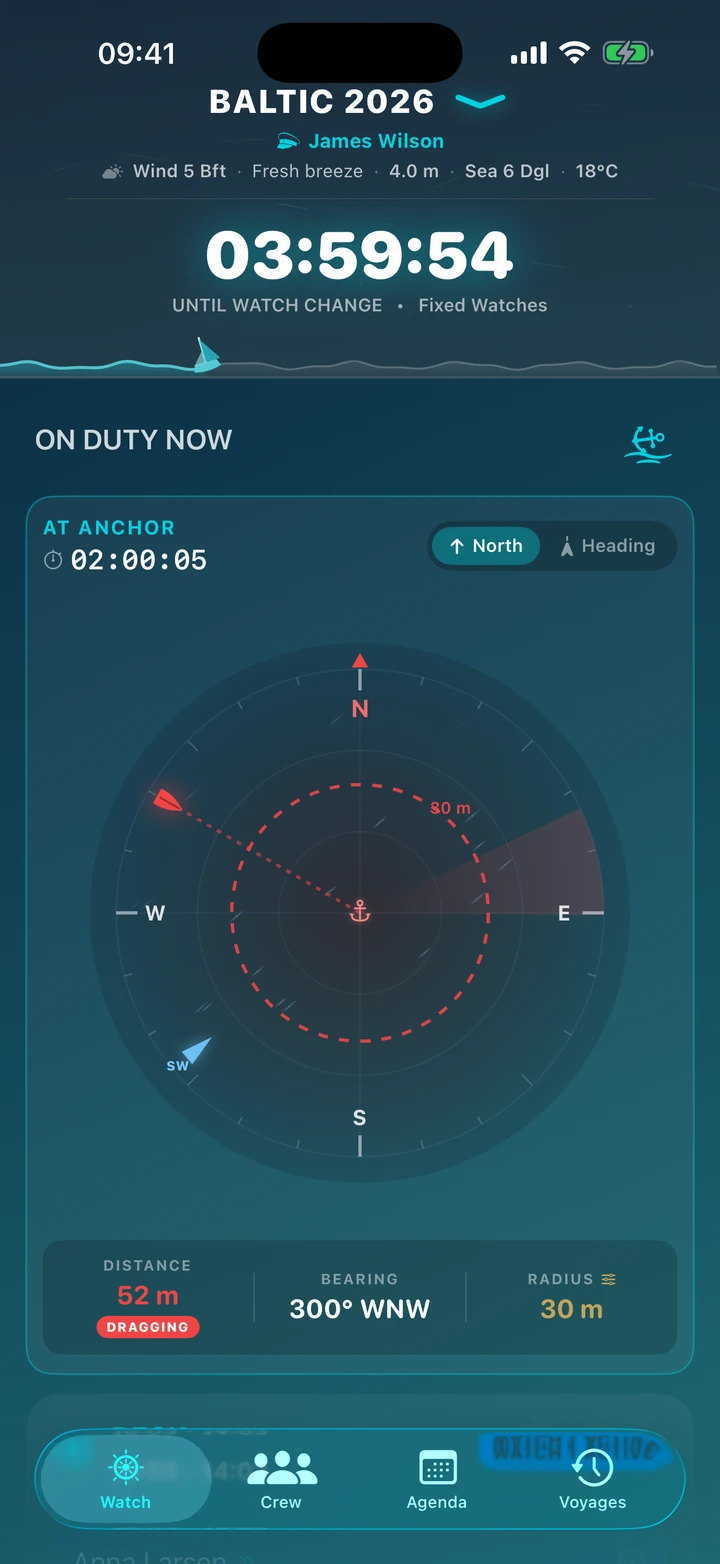
Drift radar on the voyage dashboard — anchor alarm

Drift radar

At anchor? The app watches whether your boat starts to drift.

Once you drop anchor, the drift radar turns on — showing the boat's position relative to the anchor point, the wind direction and the alarm radius. If the boat leaves the radius you set, you get an alarm — even in the background, with the phone locked.

  • Alarm radius: set the margin for your chain length (10–100 m).
  • North / Heading mode: radar stays fixed to north, or rotates with the phone.
  • Wind on the dial: wind direction and strength straight from the marine forecast.
  • Battery friendly: in the background GPS only wakes at the interval you choose.

The radar is GPS-based and assistive — it does not replace vigilance or a certified anchor alarm.

The Duty Shift app in the Free version is fully functional — it allows creating voyages, choosing different schedule scenarios, managing notifications, creating bosun task lists, setting quiet nights, and marking yourself as "It's Me."

However, if you want to share voyages, synchronize an active voyage with your crew via QR code, precisely set watch times, or manage each night individually — consider purchasing the PRO version.

Pay once, sail without limits. Price: $4.99.

Duty Shift PRO

FAQ

Frequently asked questions

Is the Wachty app free?

Yes. The Free version is fully functional — you create voyages, choose schedule scenarios, manage notifications and bosun task lists, set quiet nights and mark yourself as “It's Me”.

The PRO version is a one-time purchase ($4.99, forever). It adds PDF export, voyage export/import, QR-code sync, an anchor alarm (drift radar) and custom watch times.

How does the watch-rotation algorithm work?

In Rotational mode the algorithm reshuffles the crew at every change, ensuring equal workload and the longest possible uninterrupted rest between watches.

In Fixed mode the teams stay the same for the whole voyage. Skipper mode leaves steering to the command staff and assigns the crew a 24-hour bosun watch.

Do I need internet at sea?

No. The whole app works offline — schedule, crew, logbook and notifications need no connection. The marine forecast only downloads when you have signal, and is cached.

Where does the app get its weather forecast?

From Open-Meteo (free, no account needed). It shows Beaufort wind, temperature, Douglas waves, swell and water temperature, a Wind Rose and an hourly forecast. You can turn the weather service off in settings at any time.

What is Anchor Watch and the drift radar?

Anchor Watch (a PRO feature) keeps an eye on whether your boat is dragging anchor while moored. The screen shows a drift radar with the boat's position relative to the anchor point, the wind direction, and an alarm if the boat leaves the radius you set. It also runs in the background to save battery.

Note: the radar is GPS-based and assistive — it does not replace vigilance and is not a certified anchor alarm. Full responsibility for the safety of the mooring rests with the skipper.

Can I share a voyage with my crew?

Yes (a PRO feature). Generate a QR code — your crew scans it and instantly gets the complete voyage plan, with no data entry. You can also send a .wachty file via message, email or AirDrop.

What devices does Wachty run on?

iPhone with iOS 16 or later. The interface is available in 16 languages. There's also a home-screen widget that shows who is currently on watch.

Is my data safe?

Yes. All voyage data is stored locally on your device — no cloud, no account. Optionally, you can back it up to your own iCloud folder.

Is there an Android version?

For now Wachty is available on iOS (iPhone) only. An Android version is on the app's roadmap.

Safety

Safety & responsibility

Wachty is a tool that helps you plan and organise watches — it does not replace the knowledge, experience or judgement of the skipper.

Features based on GPS and weather (including the drift radar in Anchor Watch, the position log and the marine forecast) are assistive and may be inaccurate or unreliable. They are not marine navigation instruments or certified alarms. Never rely on them as your only safeguard while sailing or at anchor.

Full responsibility for the safety of the yacht and crew always rests with the skipper. By using the app you accept that you do so at your own risk.